
Smoothing
Use the Smoothing tool in ScriptCompiler to reduce funscript point density while preserving the original curve shape and motion.
Overview
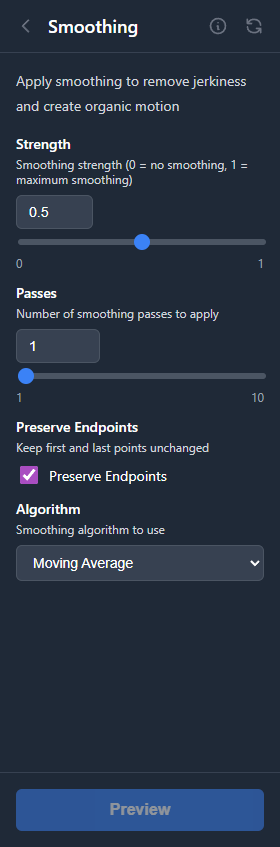
The Smoothing tool reduces the number of points in your script while maintaining the overall shape of the curve. This is useful for cleaning up scripts created by drawing or automatic generation.
How It Works
The tool uses a simplification algorithm that:
- Analyzes the curve defined by the selected points
- Identifies points that contribute least to the curve shape
- Removes redundant points while keeping key inflection points
- Preserves the first and last points of the selection
Parameters
| Parameter | Range | Default | Description |
|---|---|---|---|
| Strength | 0 to 1 | 0.5 | How aggressively to smooth the curve |
| Passes | 1 to 10 | 1 | Number of smoothing passes to apply |
| Algorithm | Moving Average, Gaussian, Bezier | Moving Average | Smoothing algorithm to use |
Higher strength values smooth the curve more aggressively. Multiple passes can be used for stronger smoothing with more predictable results. The first and last points of the selection are always preserved.
When to Use
After Drawing
Drawing mode often creates many points close together. Smoothing removes unnecessary points while keeping the pattern you drew.
After Script Sniper
AI-generated scripts may have more points than needed. Smoothing cleans up the result without losing the tracked motion.
File Size Reduction
Fewer points means smaller file sizes. Smooth scripts before sharing if file size is a concern.
Device Performance
Some devices perform better with fewer points. Smoothing can improve playback on devices that struggle with point-dense scripts.
Tips
Select Sections
Apply different smoothing levels to different sections. Detailed sections may need lower strength than simple movements.
Compare Before and After
Use the preview to compare the smoothed curve with the original. Look for any important details that might be lost.