
Stash Library
Browse and load scenes from your Stash media server directly in ScriptCompiler.
Overview
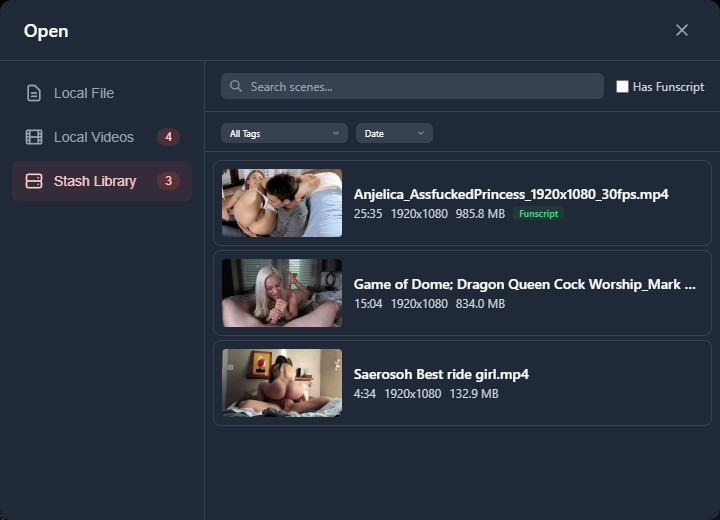
The Stash Library connects ScriptCompiler to your Stash media server. You can browse, search, filter, and load scenes directly from Stash without leaving the editor.
Access the Stash Library through the file manager (click the folder icon in the header) and select the Stash Library tab. This tab is only visible when Stash is configured and reachable.
Setup
Before using the Stash Library, you need to configure the connection:
- Open Settings from the Options menu
- Go to the Local Network tab and enable local network access
- Go to the Stash tab
- Enter your Stash server URL (for example,
http://localhost:9999) - Enter your Stash API key if authentication is required
- Click Test Connection to verify the connection works
Once connected, the test result shows the number of scenes available in your library.
Browsing Scenes
Scenes are displayed as a grid of cards. Each card shows:
- Thumbnail image from the scene
- Scene title
- Duration
- Resolution and file size
- Rating (if available)
- A Funscript badge if the scene has an associated interactive script
Results are loaded 25 scenes at a time. Use the Prev and Next buttons at the bottom to navigate between pages.
Search and Filtering
You can narrow results with several filters:
- Search bar - Search scene titles by keyword
- Interactive Only - Toggle to show only scenes that have an associated funscript file
- Performers - Filter by performer from a dropdown populated from your Stash library
- Studios - Filter by studio
- Tags - Filter by tags assigned in Stash
- Saved Filters - Apply filters you have saved in Stash
Sorting
Sort results using the sort dropdown. Available options:
- Date (newest first)
- Title (alphabetical)
- Duration
- Rating
- Play count
- Last played
- File size
- Random
Loading a Scene
Click a scene card to load it into ScriptCompiler. The video stream loads into the player. If the scene has an associated funscript in Stash, that script loads into the editor automatically.